Features:
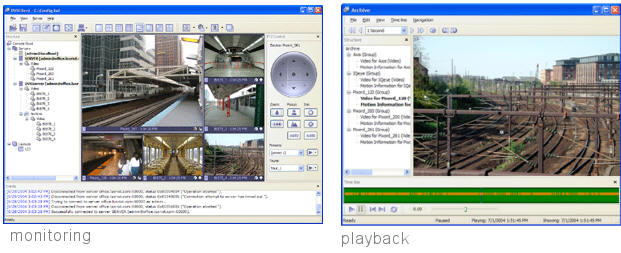 • Sizing from a
single camera to the thousands of cameras.
• Continuous recording.
• Motion Detection.
• Motion exclusion with advanced options.
• Remote connection.
• Real-time playback without interrupting recording.
• Control PTZ cameras. Pan, tilt and zoom cameras can be
fully controlled from within the Client application.
• RS-232, RS-422, RS-485 PTZ Control.
• Support for Network (IP) cameras from all major
manufacturers.
• Support for Network (IP) camera SERVERS. IP Servers
let you use regular CCTV cameras as IP cameras;
therefore getting rid of the sixteen camera limitation
that is seen with most DVR applications.
• Support ComArt HiCap and XeCap series frame grabbers
and others (see our compatibility list on
www.LuxRiot.com).
• Support for any Direct Show compatible devices
including Webcams and USB cameras.
• Multiple clients can be connected to a single server.
• Time lapse Recording. Adjustable frame recording
camera by camera.
• Adjustable image quality camera by camera.
• Full featured local and remote playback.
• Motion control recording with option for recording
frames when no motion is detected (EX. 1 FPS when no
motion and 30fps when Motion)
• Automatic detection for IP cameras available for LAN
or a WAN range of IP addresses.
• Fully-featured Client application – all functions,
without exceptions may be accessed both locally and
remotely (only one user interface). Anyone operating the
client application can connect to the server, access
live and recorded video, change settings, Manage
Watchdogs, recording properties, TCP communications etc.
in accordance with granted user rights.
• Enterprise Scalability and Monitoring (ESM) Control
and fully administer your server or an unlimited number
of servers from any computer connected on the Internet
with Luxriot client. Engineered not to use any network
resources for the open server connections and only use
network resources for the cameras you monitor at the
given time .Can be connected to unlimited server and
control unlimited cameras within those servers.
• Server can run as a Windows service. This feature
allows the LuxRiot server to run virtually unnoticed
(stealth mode). Also the server can run without user
logging into Windows, so the security of the system is
not compromised.
• Multiple screen configuration options.
• User-friendly wizards make LuxRiot easy to use and
configure. All commonly used operations, such as adding
access to a new Server from Client application,
searching for Network (IP) cameras, user management,
etc. can all be performed via intuitive wizards. This
helps make very advanced features accessible to an
average computer user.
• User Management controls access to cameras and program
features. Depending on user status, s/he can be either
allowed or denied to perform the following operations:
access archive, administer server, connect locally and
connect remotely.
• Client can be connected to multiple servers
simultaneously. A client application user, if granted
sufficient privileges, can connect to unlimited number
of servers to view live or recorded video as well as
perform other operations.
• Each camera is individually configurable, including:
recording, motion detection, image adjustments
(brightness, contrast, sharpness, hue, saturation) and
more.
• Full featured local and remote playback with search on
motion and areas of motion (SMART SEARCH)
• Client configuration (screen layout, connection to
servers, etc) is registered file type, so it is possible
to store different configuration on one computer, email
them or export them as database and open them on any
computer with the client.
• Screen may be configured for wide-screen monitor (WXGA).
• Supports all major brands of Network (IP) cameras and
Network Servers.
• Network Camera Search Wizard. Using this Wizard a user
is able to find all available network cameras, configure
them, connect them in no time and with little effort.
• Virtually Unlimited Storage Capacity.
• Can map Network drives at no additional cost for
licensing.
• Optimized and Designed for Microsoft Windows
2000/XP/2003
• Output Video to a NTSC/PAL
• Multiple resolutions support (camera by camera)up to
640x480 (frame cards) and 1600x1200 Pixels (IP Cameras)
• Use JPEG and MJPEG – Selectable (more compression
options will be available to choose)
• Free Software upgrades.
• Free distribution of the client software for unlimited
computers.
• Multi session Client (user can open multiple instances
of the client).
• Powerful search capabilities for playback.
• Web Based remote.
• Video Adjustments: Video adjustment can adjust every
individual camera with its own settings remotely and
locally. Adjustments for Brightness, Contrast,
Saturation, Sharpness, and Hue.
• Digital zoom.
• Export Snapshots.
• Export recorded video to DivX, MPEG4, can be copy to
CD as VCD.
• Supports any
Direct Show compatible devices including Webcams, USB
cameras, frame grabbers.
• Enables users to watch live and recorded images on one
monitor while continuing to record.
• Disk analysis screen display for improved recorded
data analysis.
• Software watchdog: Advance Watchdog Operations,
Programmable with maintenance settings. Watchdog can be
configured to periodically restart server services to
clear any possible problems which could deteriote server
system performance, (select different time frames (days,
hours..etc), Adjust auto settings for error control and
advance detection for problem detection and recovery.
• Advance server recording settings can be configured
locally and remotely.
• Database driven server and client.
• Client database with connections and settings that can
be exported and open on any computer running LuxRiot
(configure one client with all connections and import
database to unlimited computers)
• Exclusivity Mode: Exlusivity Mode (windows lock-out)
can be set up, to take special care to ensure LuxRiot is
the only application the user is interacting with.
Advance properties are available for startup and
password authentication is available too.
• User can select TCP port to their Preference the
default is 60554.
• Layouts: Create custom Layouts by grouping cameras
from different DVR Servers/Locations into groups for
more efficient monitoring, and better management. Drag
and drop cameras from a server or multiple servers to
custom layouts.
• Layout Sequences: Layouts can be used for Sequencing.
Layout sequences can be set in custom time intervals
with custom layout priorities. Multiple Sequences can be
created and activated at any given time.
|


Button_hybrid00.gif)


barnuuo.gif)